


推荐使用SkiaSharp
首先,安装SkiaSharp
编写好图形生成代码。
在windows 上简易代码
using SkiaSharp;
using System.Drawing;
using System.Drawing.Text;

namespace VertifyCode
{
    public class VerifyCodeHelper
    {
        private static readonly char[] Chars = { '0','1','2','3','4','5','6','8','9',
                                                'A','B','C','D','E','F','G','H','I','J','K', 'L','M','N','O','P','Q','R','S','T','U','V','W','X','Y','Z' };
        //private static readonly int Width = 90;
        //private static readonly int Height = 35;

        private static string GenCode(int num)
        {
            var code = string.Empty;
            var r = new Random();

            for (int i = 0; i < num; i++)
            {
                code += Chars[r.Next(Chars.Length)].ToString();
            }

            return code;
        }
        /// <summary>
        /// 获取图像数字验证码
        /// </summary>
        /// <returns></returns>
        public static (string code, byte[] bytes) GetVerifyCode()
        {
            var code = GenCode(4);
            int width = 128;
            int height = 45;

            Random random = new();

            //创建bitmap位图
            using SKBitmap image = new(width, height, SKColorType.Bgra8888, SKAlphaType.Premul);
            //创建画笔
            using SKCanvas canvas = new(image);
            //填充背景颜色为白色
            canvas.DrawColor(SKColors.White);

            //画图片的背景噪音线
            for (int i = 0; i < (width * height * 0.015); i++)
            {
                using SKPaint drawStyle = new();
                drawStyle.Color = new(Convert.ToUInt32(random.Next(Int32.MaxValue)));

                canvas.DrawLine(random.Next(0, width), random.Next(0, height), random.Next(0, width), random.Next(0, height), drawStyle);
            }//将文字写到画布上
            using (SKPaint drawStyle = new())
            {
                drawStyle.Color = SKColors.Red;
                drawStyle.TextSize = height;
                drawStyle.StrokeWidth = 1;

                float emHeight = height - (float)height * (float)0.14;
                float emWidth = ((float)width / code.Length) - ((float)width * (float)0.13);
                canvas.DrawText(code, emWidth, emHeight, drawStyle);
            }

            //画图片的前景噪音点
            for (int i = 0; i < (width * height * 0.15); i++)
            {
                image.SetPixel(random.Next(0, width), random.Next(0, height), new SKColor(Convert.ToUInt32(random.Next(Int32.MaxValue))));
            }

            using var img = SKImage.FromBitmap(image);
            using SKData p = img.Encode(SKEncodedImageFormat.Png, 100);
            return (code, p.ToArray());
        }
    }
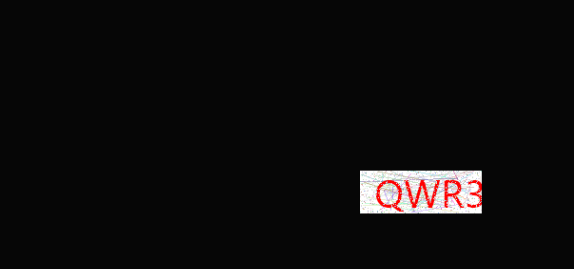
}
以上代码docker 不可用,如果需要在linux 上课用,还需要下载SkiaSharp.linux,【SkiaSharp.NativeAssets.Linux.NoDependencies】本篇着重讲在docker 环境下的使用,兼容非docker 容器
在docker 下使用的话需要使用外部字体
[HttpGet]
public FileContentResult Get()
{
    string code;
    var img = Create(out code);
    // Console.WriteLine(code);
    HttpContext.Session.SetString("code", code);
    //GC.Collect();
    return File(img.ToArray(), "image/png");
}
private static string RndNum(int VcodeNum)
{
    //验证码可以显示的字符集合
    string Vchar = "1,2,3,4,5,6,7,8,9,a,b,c,d,e,f,g,h,i,j,k,m,n,p" +
        ",q,r,s,t,u,v,w,x,y,z,A,B,C,D,E,F,G,H,J,K,L,M,N,P,Q" +
        ",R,S,T,U,V,W,X,Y,Z";
    string[] VcArray = Vchar.Split(new Char[] { ',' });//拆分成数组
    string code = "";//产生的随机数
    int temp = -1;//记录上次随机数值,尽量避避免生产几个一样的随机数

    Random rand = new Random();
    //采用一个简单的算法以保证生成随机数的不同
    for (int i = 1; i < VcodeNum + 1; i++)
    {
        if (temp != -1)
        {
            rand = new Random(i * temp * unchecked((int)DateTime.Now.Ticks));//初始化随机类
        }
        int t = rand.Next(58);//获取随机数
        if (temp != -1 && temp == t)
        {
            return RndNum(VcodeNum);//如果获取的随机数重复,则递归调用
        }
        temp = t;//把本次产生的随机数记录起来
        code += VcArray[t];//随机数的位数加一
    }
    return code;
}

public static MemoryStream Create(out string code, int numbers = 4)
{
    code = RndNum(numbers);
    MemoryStream ms = new MemoryStream();
    Random random = new Random();
    int width = 72;
    int height = 32;
    var bitmap = new SKBitmap(width, height);
    using (var canvas = new SKCanvas(bitmap))
    {
        canvas.Clear(SKColors.White);

        using (var paint = new SKPaint())
        {
            // 绘制干扰线
            paint.Color = SKColors.LightGray;
            paint.StrokeWidth = 2;

            for (int i = 0; i < 5; i++)
            {
                int x1 = random.Next(width);
                int y1 = random.Next(height);
                int x2 = random.Next(width);
                int y2 = random.Next(height);
                canvas.DrawLine(x1, y1, x2, y2, paint);
            }
            // 在随机位置画背景点
            for (int i = 0; i < 100; i++)
            {
                int x = random.Next(width);
                int y = random.Next(height);
                canvas.DrawCircle(x, y, 1, paint);
            }
            SKFont sKFont = new SKFont();
            // 绘制文字
            sKFont.Size = 21;
            paint.IsAntialias = true;
            //sKFont.Typeface = SKTypeface.FromFamilyName("Arial", SKFontStyleWeight.Bold, SKFontStyleWidth.Normal, SKFontStyleSlant.Upright);
            sKFont.Typeface = SKTypeface.FromFile("msyh.ttc");
            float textWidth = sKFont.MeasureText(code,paint);
            SKColor[] fcolor = { SKColors.Black, SKColors.Red, SKColors.DarkBlue, SKColors.Green, SKColors.Orange, SKColors.Brown, SKColors.DarkCyan, SKColors.Purple,SKColors.DeepPink };
            for (int i = 0; i < code.Length; i++)
            {
                int top = random.Next(5, 15);
                int cindex = random.Next(7);
                paint.Color = fcolor[cindex];
                canvas.DrawText(code.Substring(i, 1), 5 + (i * 16), height / 2 + top, sKFont, paint);

            }
        }
    }
    using var image = SKImage.FromBitmap(bitmap);
    using var data = image.Encode(SKEncodedImageFormat.Png, 100);
    //using var stream = new MemoryStream();
    data.SaveTo(ms);
    //bitmap.Save(ms,SerializerCompression.GZip);
    return ms;

}
需要先把字体放在资源目录,记得字体文件要改为始终复制,本篇用到的是微软雅黑
然后打包到linux 放进docker即可成功显示
评论 (0)